You signed in with another tab or window. Reload to refresh your session.You signed out in another tab or window. Reload to refresh your session.You switched accounts on another tab or window. Reload to refresh your session.Dismiss alert
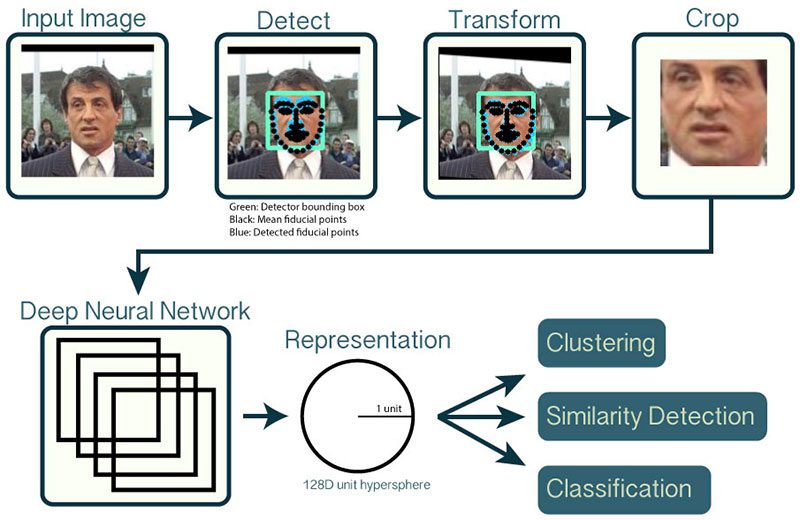
This project demonstrates real-time face recognition using OpenCV and the face_recognition library in Python. It identifies faces in a live video stream and compares them to known individuals from pre-loaded images.
Requirements
Python 3.x
OpenCV (cv2)
Face_recognition
Mobilenet and coco pretrained model
Frozen model
Explanation
Imports
The script imports necessary libraries, including OpenCV (cv2) and face_recognition
Image Loading
Known faces are loaded using "face_recognition.load_image_file".
Encoding Generation
Encodings of known faces are generated using "face_recognition.face_encodings".
Video Capture
A video capture object is created to access the webcam stream.
Main Loop
Reads a frame from the video capture.
Resizes the frame for faster processing.
Converts the frame to BGR color format (OpenCV's default).
face_locations = face_recognition.face_locations(rgb_small_frame) to detect faces in the resized frame if needed.
Compares each face encoding against known face encodings using face_recognition.compare_faces.
Video Display
The processed frame with bounding boxes and names (if applicable) is displayed using cv2.imshow
Exiting
The script exits when the 'q' key is pressed.
The video capture and OpenCV windows are released for proper cleanu
Customization
You can modify the script to include more known faces by adding their images and corresponding names to the known_faces folder.
You can adjust the fx and fy values in small_frame = cv2.resize(frame, (0, 0), fx=0.25, fy=0.25) to control the resizing factor for processing efficiency.
Explore more advanced face recognition techniques from the face_recognition library, such as face distance thresholds for more robust matching.
Use Cases
Mobile Applications
Augmented Reality (AR): Enhance user experience by overlaying information or virtual objects onto real-world scenes. Imagine pointing your phone camera at a building and seeing its blueprints or historical information displayed. MobileNet's efficiency allows for real-time object detection on smartphones for such AR applications.
Object Recognition and Search: Enable users to point their phones at objects to identify them or search for similar items online. This could be helpful for identifying plants, clothing items, furniture, or even landmarks while traveling.
Security and Surveillance: Implement real-time object detection for security cameras on mobile devices. For example, detect people trespassing in restricted areas or identify suspicious objects left unattended.
Embedded Systems
Smart Home Automation: Use object detection to trigger automations. For instance, detect a person entering a room and turn on the lights, or identify a pet and activate a feeder.
Industrial Automation: Deploy object detection systems on robots or drones for tasks like inventory management, defect detection in manufacturing processes, or monitoring machinery for safety hazards.
Traffic Monitoring: Implement object detection in traffic cameras to analyze traffic flow, identify accidents, and optimize traffic light timing. MobileNet's efficiency is crucial for real-time processing on embedded devices often used in these scenarios.
General Object Detection Tasks
Retail Industry: Use object detection for tasks like automatic checkout (identifying and pricing items), inventory management (tracking stock levels), or analyzing customer behavior in stores.
Agriculture: Implement object detection in drones or ground vehicles to assess crop health, identify pests or diseases, and optimize resource use.
Environmental Monitoring: Use object detection to track wildlife populations, monitor deforestation, or detect illegal activities in protected areas.
About
OpenCV (cv2) can be used for face recognition by detecting faces, extracting facial features, and comparing them to a database of known faces.