ISSUE TYPE
- Enhancement Request
- Documentation Report
OS / ENVIRONMENT
- OS Version: Red Hat Enterprise Linux Server release 8.4 (Ootpa)
- openvswitch-2.12.0-1.1.el8.x86_64
The uname -a command is

The cloudstack work node is using KVM + openvswitch (http://docs.cloudstack.apache.org/en/latest/installguide/hypervisor/kvm.html#configuring-the-network-bridges-for-openvswitch )

The related configuration is as below:
The switch configuration:
add profile XXXXXXXX -NoDefaultEnetConn -NoDefaultFcConn -NoDefaultFcoeConn -quiet NAG=Default HideUnusedFlexNICs=true BootMode=Auto
add enet-connection XXXXXXXX -quiet Network=Unassigned PXE=UseBIOS SriovType=Disabled
add enet-connection XXXXXXXX -quiet Network=Unassigned PXE=UseBIOS SriovType=Disabled
add server-port-map-range XXXXXXXX:1 UplinkSet=UplinkSet_A vlanids=136,290-291
add server-port-map-range XXXXXXXX:2 UplinkSet=UplinkSet_B vlanids=136,290-291

assign profile XXXXXXXX enc0:2

First we create a main bridge connected to the bond0 interface. Next we create three fake bridges, each connected to a specific vlan tag.
# ovs-vsctl add-br cloudbr
# ovs-vsctl add-bond cloudbr bond0 eno1 eno2
# ovs-vsctl set port cloudbr trunks=136,290,291
# ovs-vsctl add-br mgmt0 cloudbr 136
# ovs-vsctl add-br cloudbr0 cloudbr 290
# ovs-vsctl add-br cloudbr1 cloudbr 291
The ifcfg-eno1 network configuration:
TYPE=Ethernet
BOOTPROTO=none
UUID=f8a7f9c7-b5fc-4887-a656-50b9e0cd787b
DEVICE=eno1
ONBOOT=yes
The ifcfg-eno2 network configuration:
TYPE=Ethernet
BOOTPROTO=none
UUID=0e8b0ab7-63c6-4704-9c27-01ee68098d6f
DEVICE=eno2
ONBOOT=yes
The ifcfg-bond0 configuration:
DEVICE=bond0
NAME=bond0
BOOTPROTO=none
ONBOOT=yes
HOTPLUG=no
TYPE=OVSBond
DEVICETYPE=ovs
OVS_BRIDGE=cloudbr
BOND_IFACES="eno1 eno2"
OVS_OPTIONS="bond_mode=balance-tcp lacp=active"
The ifcfg-mgmt0 configuration:
DEVICE=mgmt0
DEVICETYPE=ovs
TYPE=OVSBridge
BOOTPROTO=none
ONBOOT=yes
HOTPLUG=no
IPADDR=10.67.36.200
NETMASK=255.255.252.0
GATEWAY=10.67.39.254
The ifcfg-cloudbr0 configuration:
DEVICE=cloudbr0
BOOTPROTO=none
ONBOOT=yes
HOTPLUG=no
TYPE=OVSBridge
DEVICETYPE=ovs
The ifcfg-cloudbr1 configuration:
DEVICE=cloudbr1
BOOTPROTO=none
ONBOOT=yes
HOTPLUG=no
TYPE=OVSBridge
DEVICETYPE=ovs
The ovs-vsctl command is :
# ovs-vsctl show
fd8f7b60-f922-462f-b5c1-a9742e00bf89
    Bridge cloudbr
        Port cloudbr
            trunks: [136, 290, 291]
            Interface cloudbr
                type: internal
        Port "mgmt0"
            tag: 136
            Interface "mgmt0"
                type: internal
        Port "bond0"
            Interface "eno2"
            Interface "eno1"
        Port "cloudbr0"
            tag: 290
            Interface "cloudbr0"
                type: internal
        Port "cloudbr1"
            tag: 291
            Interface "cloudbr1"
                type: internal
    ovs_version: "2.12.0"
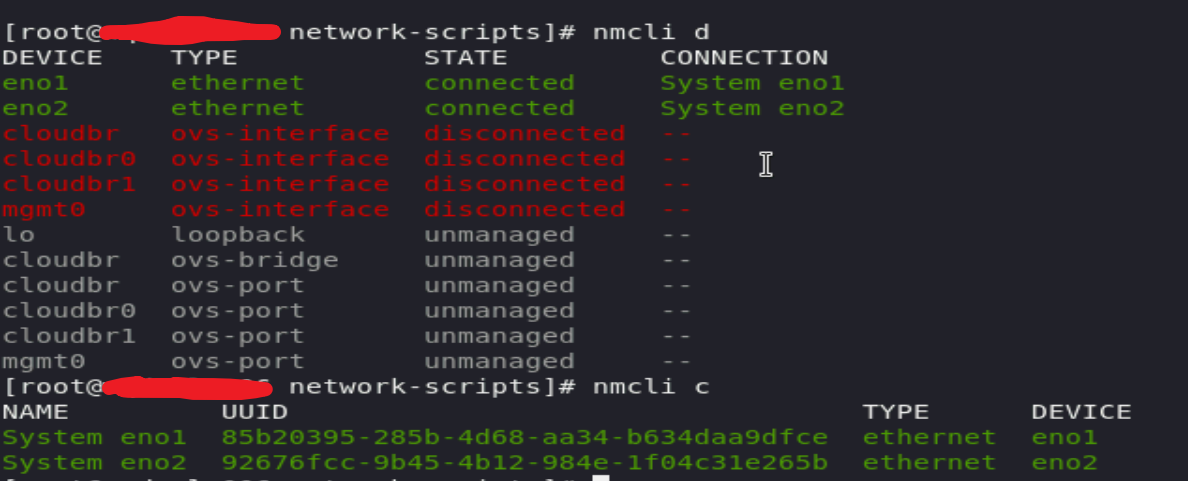
The nmcli command is
The ip addr command is

The ip link command is

The route command is

It seems the network card eno1 and eno2 status is not ok. So I think this is the problem.
The ovs-appctl bond/show command is
# ovs-appctl bond/show
---- bond0 ----
bond_mode: balance-tcp
bond may use recirculation: yes, Recirc-ID : 2
bond-hash-basis: 0
updelay: 0 ms
downdelay: 0 ms
next rebalance: 6733 ms
lacp_status: configured
lacp_fallback_ab: false
active slave mac: 00:00:00:00:00:00(none)

slave eno1: disabled
  may_enable: false

slave eno2: disabled
  may_enable: false

ISSUE TYPE
OS / ENVIRONMENT
The uname -a command is
The cloudstack work node is using KVM + openvswitch (http://docs.cloudstack.apache.org/en/latest/installguide/hypervisor/kvm.html#configuring-the-network-bridges-for-openvswitch )
The related configuration is as below:
The switch configuration:
First we create a main bridge connected to the bond0 interface. Next we create three fake bridges, each connected to a specific vlan tag.
The ifcfg-eno1 network configuration:
The ifcfg-eno2 network configuration:
The ifcfg-bond0 configuration:
The ifcfg-mgmt0 configuration:
The ifcfg-cloudbr0 configuration:
The ifcfg-cloudbr1 configuration:
The ovs-vsctl command is :
The nmcli command is

The ip addr command is
The ip link command is

The route command is

It seems the network card eno1 and eno2 status is not ok. So I think this is the problem.
The ovs-appctl bond/show command is