Description
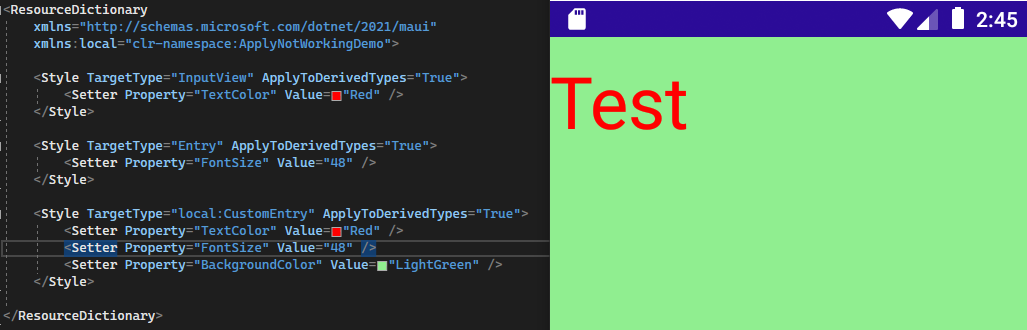
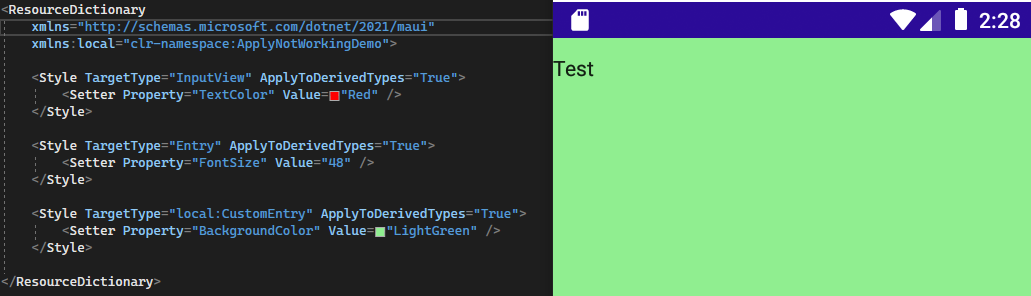
I tried to specify implicit styles for InputView, Entry and a custom Entry that should complement each other. In reality, only the most specific style is applied and the styles of the base types are ignored.
Note: I did not test on platforms other than Android and Windows
Expected visuals
Actual visuals
Steps to Reproduce
Reproduction Repository
OR
Try to set an implicit style for two different properties, one on InputView and one on Entry and specify ApplyToDerivedTypes="True" on them. You will notice that only the most specific style is applied to the Entry.
Version with bug
6.0.486 (current)
Last version that worked well
Unknown/Other
Affected platforms
Android, Windows
Affected platform versions
Android: 5 and up, Windows: 10.0.17763.0 and up
Did you find any workaround?
Yes, setting all properties explicitly for each specific target type
Relevant log output
No response

Description
I tried to specify implicit styles for InputView, Entry and a custom Entry that should complement each other. In reality, only the most specific style is applied and the styles of the base types are ignored.
Note: I did not test on platforms other than Android and Windows
Expected visuals
Actual visuals
Steps to Reproduce
Reproduction Repository
OR
Try to set an implicit style for two different properties, one on InputView and one on Entry and specify
ApplyToDerivedTypes="True"on them. You will notice that only the most specific style is applied to the Entry.Version with bug
6.0.486 (current)
Last version that worked well
Unknown/Other
Affected platforms
Android, Windows
Affected platform versions
Android: 5 and up, Windows: 10.0.17763.0 and up
Did you find any workaround?
Yes, setting all properties explicitly for each specific target type
Relevant log output
No response