macvim version:
$ brew info macvim
macvim: stable 8.1-151 (bottled), HEAD
GUI for vim, made for macOS
https://github.com/macvim-dev/macvim
/usr/local/Cellar/macvim/8.1-151 (2,173 files, 34.9MB) *
  Poured from bottle on 2018-11-01 at 21:00:51
From: https://github.com/Homebrew/homebrew-core/blob/master/Formula/macvim.rb
I am running macvim on:
macOS Mojave version 10.14.1
Issue:
I updated macvim to 8.1-151 after Mojave, space in between wide character is not display properly.
For example, when I am trying to display this ascii diagram:
┌───────────────┐              ┌──────────────┐
│               │              │              │
│               │              │              │
│               │              │              │
│               ├─────────────▶│              │
│               │              │              │
│               │              │              │
│               │              │              │
│               │              │              │
└───────────────┘              │              │
                               └──────────────┘
where '┌' ,'└', ','┘', '┐', ' ─', and '▶' are wide character; while '│', and ' ' (space) are normal character.
The rendering in MacVim shows:

my font setting are:
guifont=Inconsolata:h14
guifontwide=
encoding=utf-8
ambiwidth=single
Inconsolata is fix width font the width of charecter should be identical, but the rendering clearly shown otherwise.
Expected correct behaviour
I am expected this to be displayed like:

The above is running vim in terminal that using the same font but different size: Inconsolata Regular 17pt.
I have tried:
set guifontwide=Menlo Regular:h14
Because help: guifontwide seem to indicates that macvim will use font specified in guifontwide when displaying wide character. But setting this does not help either.
I don't think this has to do with guifontwide, it is more likely due to the how macvim render the space between character and I believe that the rendering behaviour has changed since Mojave update..
Here is another example of where wide character display that result in misalignment:

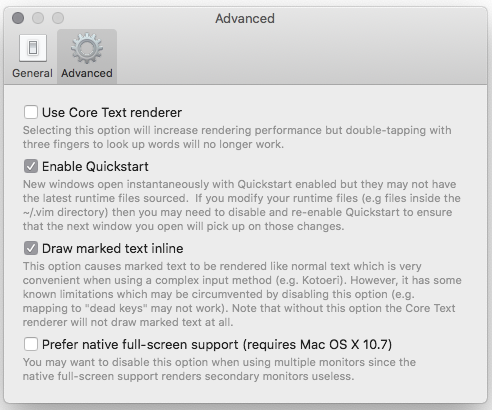
I am not using 'Core Text renderer', here is my preference for macvim:


macvim version:
I am running macvim on:
Issue:
I updated macvim to 8.1-151 after Mojave, space in between wide character is not display properly.
For example, when I am trying to display this ascii diagram:
┌───────────────┐ ┌──────────────┐ │ │ │ │ │ │ │ │ │ │ │ │ │ ├─────────────▶│ │ │ │ │ │ │ │ │ │ │ │ │ │ │ │ │ │ └───────────────┘ │ │ └──────────────┘where '┌' ,'└', ','┘', '┐', ' ─', and '▶' are wide character; while '│', and ' ' (space) are normal character.
The rendering in MacVim shows:
my font setting are:
Inconsolata is fix width font the width of charecter should be identical, but the rendering clearly shown otherwise.
Expected correct behaviour
I am expected this to be displayed like:

The above is running vim in terminal that using the same font but different size: Inconsolata Regular 17pt.
I have tried:
Because
help: guifontwideseem to indicates that macvim will use font specified in guifontwide when displaying wide character. But setting this does not help either.I don't think this has to do with guifontwide, it is more likely due to the how macvim render the space between character and I believe that the rendering behaviour has changed since Mojave update..
Here is another example of where wide character display that result in misalignment:
I am not using 'Core Text renderer', here is my preference for macvim: