Steps to reproduce
- Create a deck
- Click on details → share
- From the share list, select a group
Expected behaviour
The deck should be shared with all members of the selected group, a group icon should be shown.
Actual behaviour
No group icon is shown.

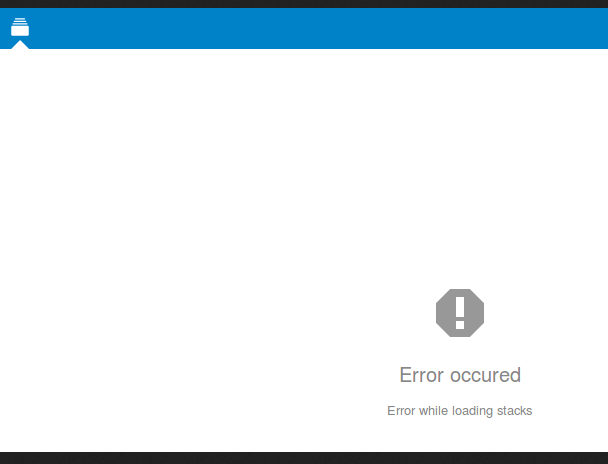
People in the group see the boards in the left sidebar, but when they click on it, they see "error occured"
Server configuration
General server configuration
Operating system: Linux web 3.16.0-4-amd64 #1 SMP Debian 3.16.43-2+deb8u2 (2017-06-26) x86_64
Web server: nginx/1.12.0 (fpm-fcgi)
Database: pgsql PostgreSQL 9.4.13 on x86_64-unknown-linux-gnu, compiled by gcc (Debian 4.9.2-10) 4.9.2, 64-bit
PHP version: 7.0.18-1~dotdeb+8.1
PHP-modules loaded
 - Core
 - date
 - libxml
 - openssl
 - pcre
 - zlib
 - filter
 - hash
 - Reflection
 - SPL
 - session
 - standard
 - cgi-fcgi
 - PDO
 - xml
 - calendar
 - ctype
 - curl
 - dom
 - mbstring
 - fileinfo
 - ftp
 - gd
 - gettext
 - iconv
 - imagick
 - intl
 - json
 - exif
 - mcrypt
 - pdo_pgsql
 - pgsql
 - Phar
 - posix
 - readline
 - shmop
 - SimpleXML
 - sockets
 - sysvmsg
 - sysvsem
 - sysvshm
 - tokenizer
 - wddx
 - xmlreader
 - xmlwriter
 - xsl
 - zip
 - Zend OPcache
Nextcloud configuration
Nextcloud version: 12.0.2 - 12.0.2.0
Updated from an older Nextcloud/ownCloud or fresh install: updated from 11.0.X (latest 11.X version)
Where did you install Nextcloud from: manually
Are you using external storage, if yes which one: files_external is disabled
Are you using encryption: no
Are you using an external user-backend, if yes which one: No (LDAP/ActiveDirectory/Webdav/...)
Signing status
Enabled apps
 - activity: 2.5.2
 - admin_audit: 1.2.0
 - bruteforcesettings: 1.0.2
 - calendar: 1.5.3
 - comments: 1.2.0
 - contacts: 1.5.3
 - dav: 1.3.0
 - deck: 0.2.2
 - federatedfilesharing: 1.2.0
 - federation: 1.2.0
 - files: 1.7.2
 - files_accesscontrol: 1.2.4
 - files_pdfviewer: 1.1.1
 - files_sharing: 1.4.0
 - files_texteditor: 2.4.1
 - files_trashbin: 1.2.0
 - files_versions: 1.5.0
 - files_videoplayer: 1.1.0
 - firstrunwizard: 2.1
 - gallery: 17.0.0
 - issuetemplate: 0.2.2
 - logreader: 2.0.0
 - lookup_server_connector: 1.0.0
 - nextcloud_announcements: 1.1
 - notifications: 2.0.0
 - oauth2: 1.0.5
 - password_policy: 1.2.2
 - provisioning_api: 1.2.0
 - serverinfo: 1.2.0
 - sharebymail: 1.2.0
 - survey_client: 1.0.0
 - systemtags: 1.2.0
 - theming: 1.3.0
 - twofactor_backupcodes: 1.1.1
 - updatenotification: 1.2.0
 - workflowengine: 1.2.0
Disabled apps
 - audioplayer
 - encryption
 - files_external
 - passman
 - passwords
 - richdocuments
 - user_external
 - user_ldap
Content of config/config.php
{
    "instanceid": "oclkocba418a",
    "passwordsalt": "***REMOVED SENSITIVE VALUE***",
    "secret": "***REMOVED SENSITIVE VALUE***",
    "trusted_domains": [
        "files.neutrinet.be"
    ],
    "datadirectory": "\/var\/www\/files-neutrinet-be\/data",
    "overwrite.cli.url": "https:\/\/files.neutrinet.be",
    "dbtype": "pgsql",
    "version": "12.0.2.0",
    "dbname": "nextcloud",
    "dbhost": "localhost",
    "dbport": "",
    "dbtableprefix": "oc_",
    "dbuser": "***REMOVED SENSITIVE VALUE***",
    "dbpassword": "***REMOVED SENSITIVE VALUE***",
    "logtimezone": "UTC",
    "installed": true,
    "updater.release.channel": "stable",
    "maintenance": false,
    "loglevel": 2,
    "data-fingerprint": "8f747e72eb1d8ae9fbd532a528c15c3a",
    "updater.secret": "***REMOVED SENSITIVE VALUE***",
    "theme": ""
}
Login as admin user into your Nextcloud and access
http://example.com/index.php/settings/integrity/failed
No errors have been found.
List of activated apps:
If you have access to your command line run e.g.:
sudo -u www-data php occ app:list
from within your Nextcloud installation folder
Client configuration
Browser:
Operating system:
Logs
Nextcloud log (data/nextcloud.log)
Insert your Nextcloud log here
Browser log
Insert your browser log here, this could for example include:

a) The javascript console log
b) The network log
c) ...

Steps to reproduce
Expected behaviour
The deck should be shared with all members of the selected group, a group icon should be shown.
Actual behaviour
No group icon is shown.

People in the group see the boards in the left sidebar, but when they click on it, they see "error occured"

Server configuration
General server configuration
Operating system: Linux web 3.16.0-4-amd64 #1 SMP Debian 3.16.43-2+deb8u2 (2017-06-26) x86_64
Web server: nginx/1.12.0 (fpm-fcgi)
Database: pgsql PostgreSQL 9.4.13 on x86_64-unknown-linux-gnu, compiled by gcc (Debian 4.9.2-10) 4.9.2, 64-bit
PHP version: 7.0.18-1~dotdeb+8.1
PHP-modules loaded
Nextcloud configuration
Nextcloud version: 12.0.2 - 12.0.2.0
Updated from an older Nextcloud/ownCloud or fresh install: updated from 11.0.X (latest 11.X version)
Where did you install Nextcloud from: manually
Are you using external storage, if yes which one: files_external is disabled
Are you using encryption: no
Are you using an external user-backend, if yes which one: No (LDAP/ActiveDirectory/Webdav/...)
Signing status
Enabled apps
Disabled apps
Content of config/config.php
List of activated apps:
Client configuration
Browser:
Operating system:
Logs
Nextcloud log (data/nextcloud.log)
Browser log